Smart Dock: How to Optimize Your Dock and Yard Management

Marie-Claude Plante
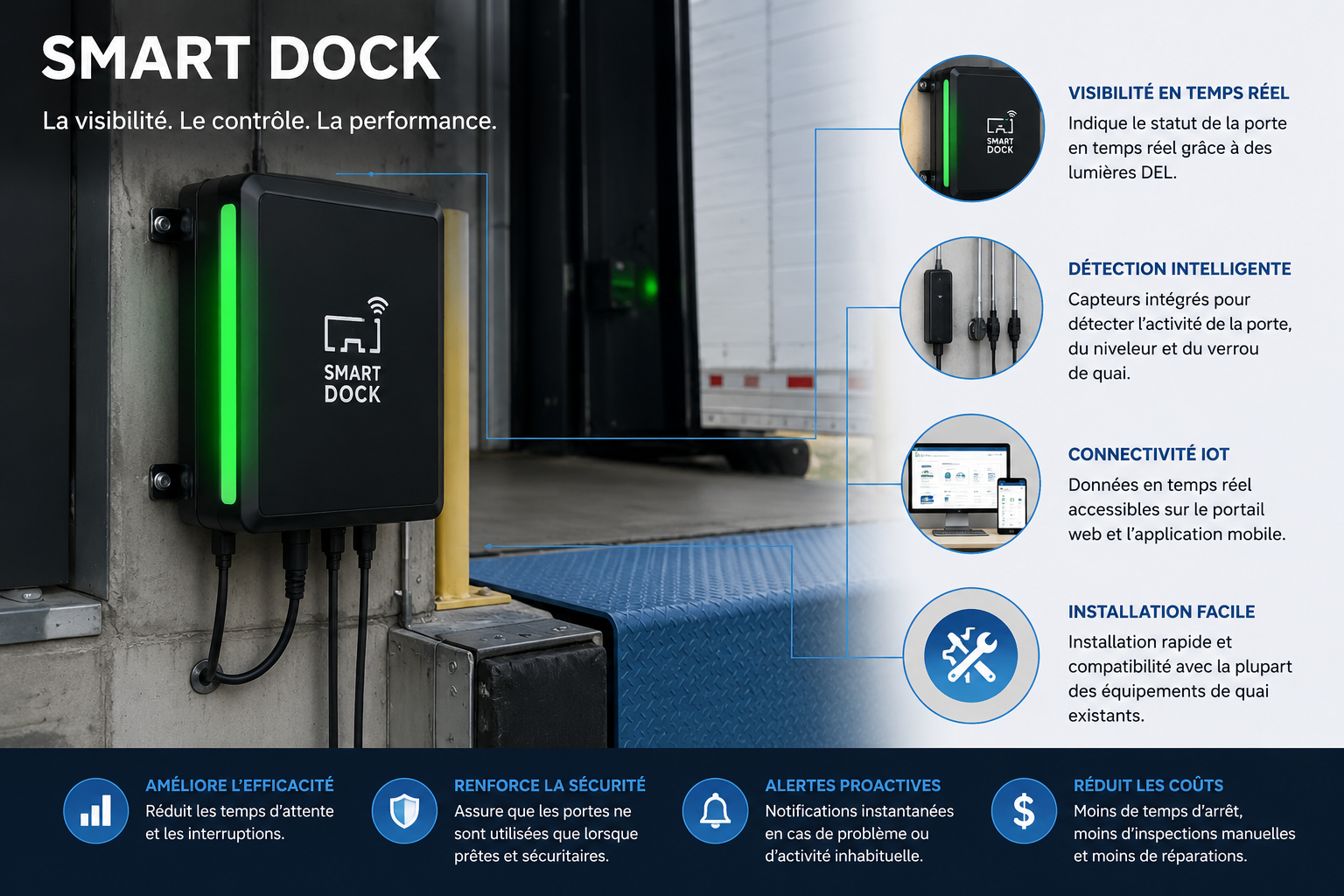
Managing a loading dock means constantly juggling carrier schedules, dock status, trailer movements, and daily unforeseen events. When this information is scattered across multiple systems, errors accumulate and delays become costly. Smart Dock is an integrated solution that centralizes everything in one place, ensuring your team always has the right information at the right time. This article explains what Smart Dock does, how it works, and why it can transform your operations.
Key takeaways
- Smart Dock centralizes thereceiving and shipping schedule in a single web portal.
- The trailer and appointment statuses are updated automatically thanks to Smart Yard integration.
- Carriers have their own portal to book appointments and track their trips.
- Performance data allows you to assess carrier punctuality and operational times.
- The tool integrates with your existing systems via configurable imports.
What exactly is Smart Dock?
Smart Dock is a web portal for dock and yard management developed by Eagle Eye Solutions. It is designed for businesses that receive and ship goods by truck and need clear control over their yard operations.
The solution combines two complementary tools:
- Smart Dock : the central portal for scheduling appointments, assigning carriers and docks, and managing trips.
- Smart Yard : the mobile application that allows yard employees to record arrivals and departures, scan bills of lading (BOLs), and initiate trailer movements.
Together, they form an integrated process where every action in the field is reflected in real-time in the portal.
What problems does Smart Dock solve?
Many loading yards still operate with Excel spreadsheets, phone calls, and handwritten notes. The result: lost information, inefficient dock allocation, undocumented delays, and no way to assess actual performance.
Smart Dock addresses these challenges directly:
How are statuses updated automatically?
This is one of the most tangible benefits of the solution. Thanks to the integration between Smart Dock and Smart Yard, four key statuses are triggered without manual intervention :
- Trailer Arrived : as soon as the trailer passes through the gate, the BOL automatically changes to "Arrived" status.
- In progress : the operation time starts as soon as the trailer is docked or the first pallet is confirmed.
- Loading/Unloading Complete : the operation time ends when the trailer leaves the dock or the last pallet is confirmed.
- Trailer Departure : the BOL status changes to 'Departed' as soon as the trailer leaves the yard, which triggers the tracking of recovery times.
This automation eliminates missed updates and provides an accurate picture of what is actually happening in the yard at all times.
What tools are available for carriers?
Smart Dock includes a carrier portal accessible online. From this portal, carriers can book their appointments, check the status of their trips, report delays, and access site information. The interface includes a detailed history, a calendar view, and video tutorials.
As for notifications, the system allows for customizing notifications according to the trip stages. For example, an alert can be sent automatically if a trailer has not been picked up on time, or if a product has been held in the yard for too long.
How to take the next step?
If you are currently managing your yard operations with unconnected tools, here is a simple approach:
- Assess your needs : how many docks do you have? How many trips do you process per day? What data are you currently missing?
- Check compatibility : Smart Dock offers configurable imports to connect with most existing management systems.
- Schedule a demo : the best way to evaluate a logistics tool is to see it in action in a context similar to yours.
If you are responsible for operations or logistics, a solution like Smart Dock can reduce the time spent on manual coordination and improve the reliability of your performance data.
Best practices for getting the most out of Smart Dock
- Involve carriers from the start : the more they use the portal to book their appointments, the less your team has to manage by phone.
- Enable relevant notifications : only configure useful alerts to avoid information overload.
- Regularly review performance data : punctuality and operation time indicators are valuable for constructive conversations with your transportation partners.
- Use the Smart Yard mobile app : it's the link between what happens in the yard and what the office sees.
Towards smoother operations
Dock management is often underestimated in logistics operations, but it has a direct impact on deadlines, costs, and partner satisfaction. Smart Dock offers a clear and structured approach to regain control, with tools adapted for both office teams and yard employees. It's a solution designed for real-world operations, not theoretical presentations.
Ready to regain control of your yard? The team at Solutions Prox-Secur is here to analyze your needs and offer you a concrete solution.
Contact us with any questions about this product.
Frequently Asked Questions
Sign up for our newsletter
Do you know our advice even in your daily life?